New — Phoenix Pro option
All your stations, on a computer and on a phone

Supervision
All your stations at a glance

Supervision monitors every station of your network remotely: a board of all stations with their status, the health of each workstation, the time gap over 24 hours, the history of incidents. An alert on the phone as soon as a station has a problem, and a summary by e-mail every morning.
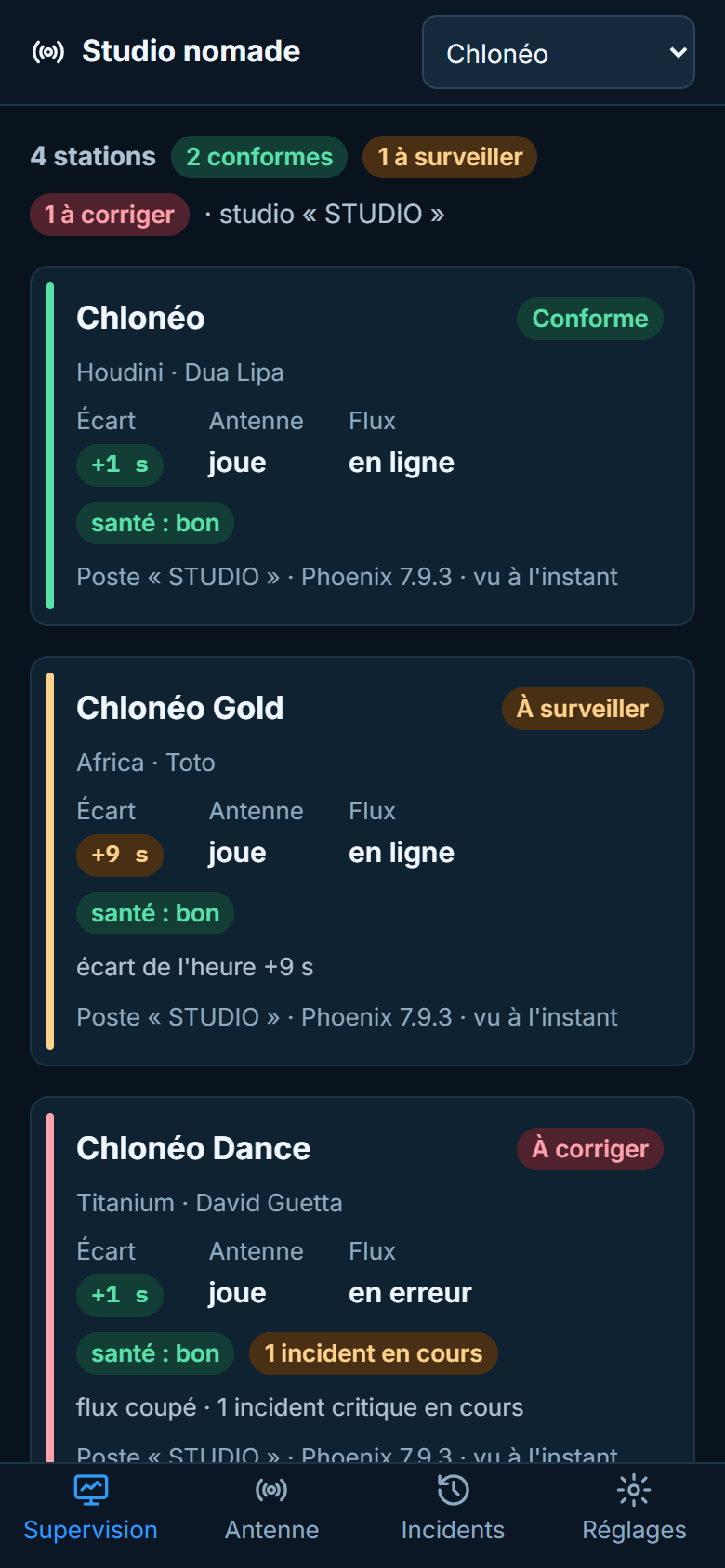
Supervision on a phone: four stations, two compliant, one to watch, one to fix
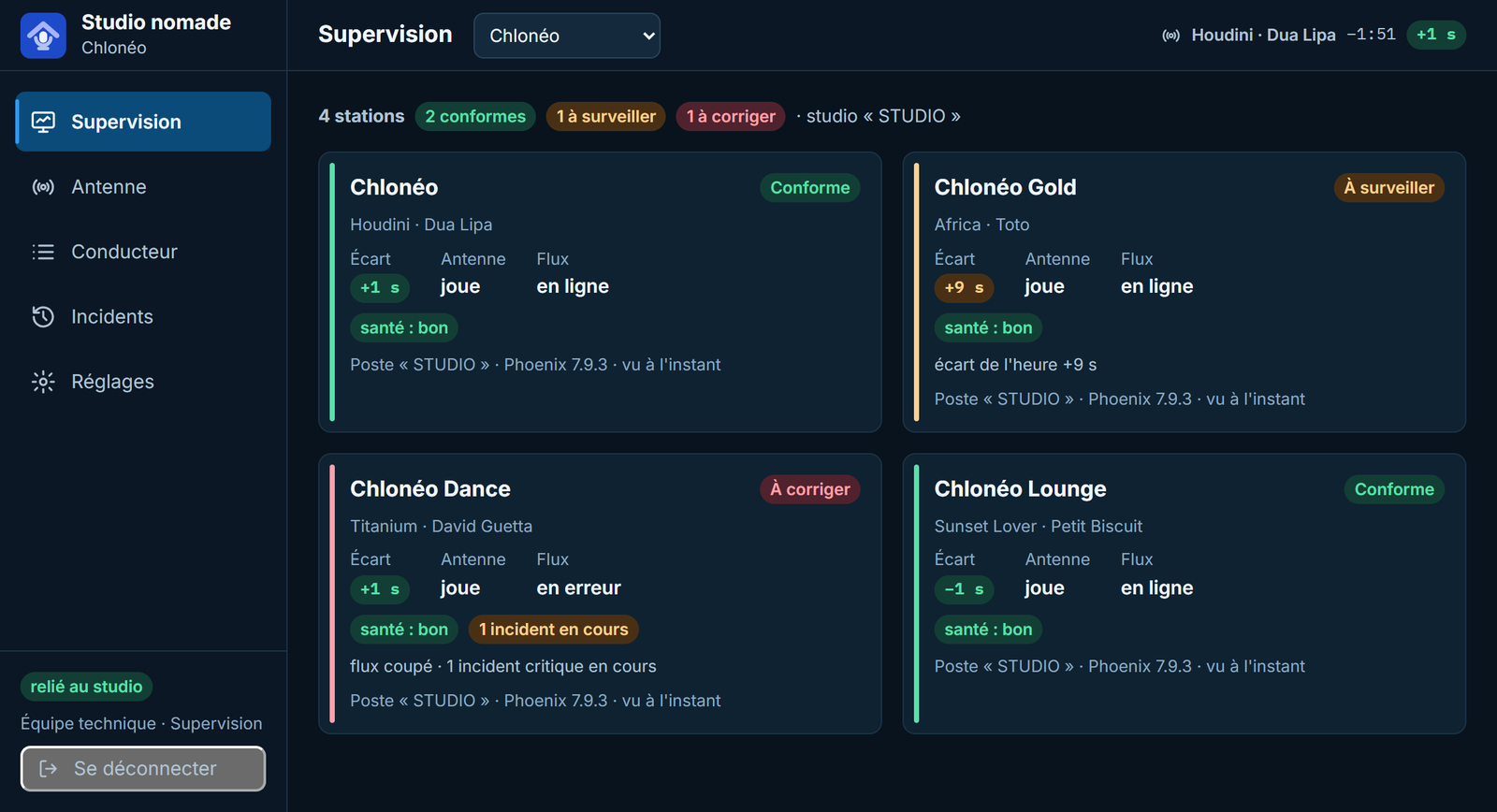
Supervision board: four stations, each with its status, the song on air, the time gap, the state of the air and of the stream, the health of the workstation
The board of all stations. One tile per station, edged in its colour — compliant, to watch, to fix — with the reasons spelled out, what is on air, the time gap, the stream and the health of the workstation. One click opens the station page.

For those who answer for the air

A stream probe says “sound” or “no sound”. Supervision sees what happens inside each station.

🛠️

Technical management

Phoenix silent, air stopped, time drifting, a disk filling up, the PC clock off, a missed backup, the backup PC on air: they know before the listener does.

🌐

Radio networks

All stations on one screen, each with its status and its reasons. At the top of the board, the count of stations compliant, to watch and to fix.

📋

Management

Every morning at 7 am, an e-mail sums up the last 24 hours: the status of each station and its incidents. Everyone can ask for it or turn it down.

A page for every station, a history of every incident

On a computer as on a phone, in the browser: nothing to install.

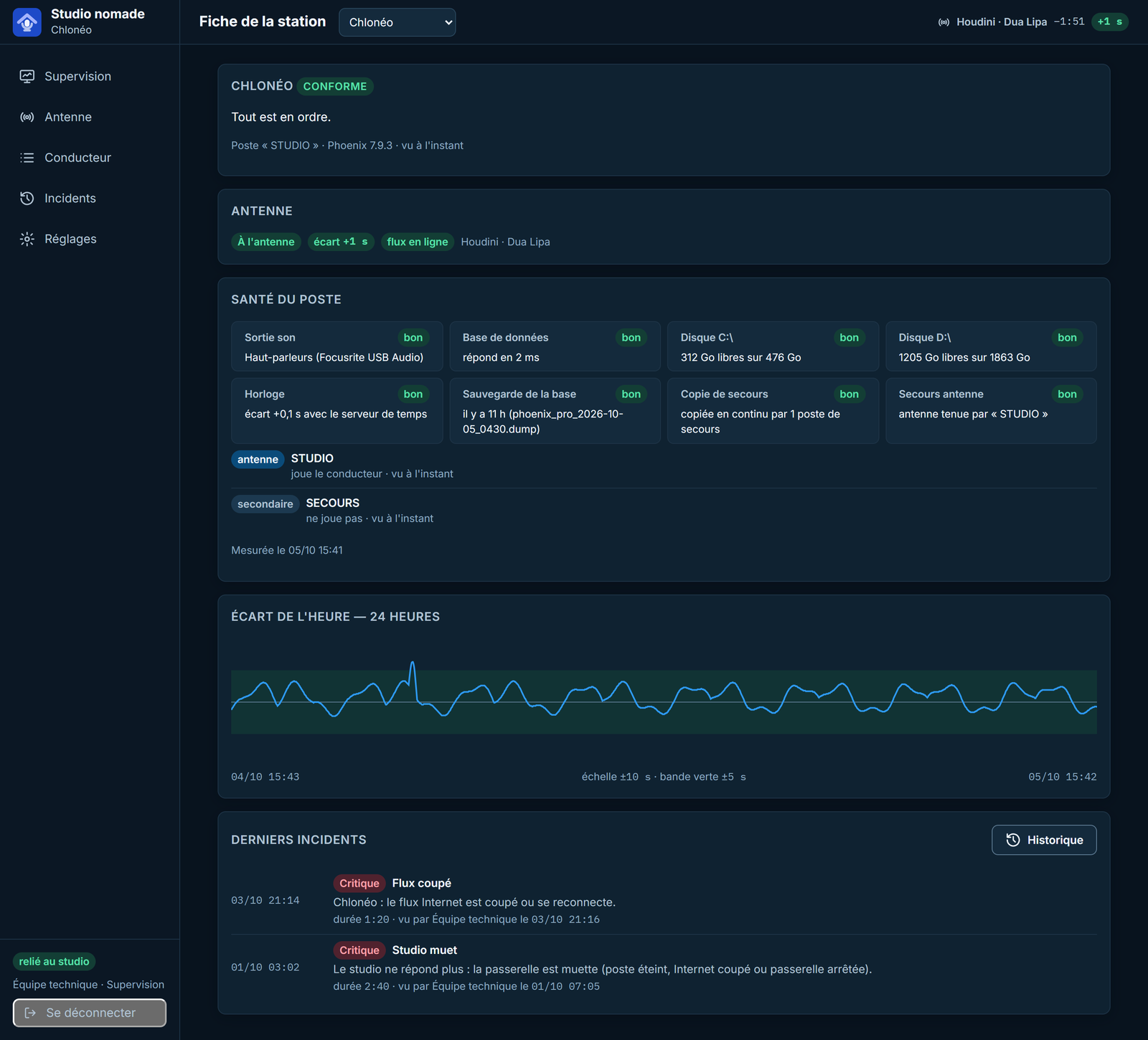
Chlonéo station page: compliant, on air, workstation health item by item, Studio and Backup workstations, time gap curve over 24 hours, latest incidents
A station page. The health of the workstation — sound output, database, disks, clock, database backup, backup copy, On-Air Failover —, the station's workstations, the time gap curve over 24 hours with the ±5 s band, and the latest incidents.
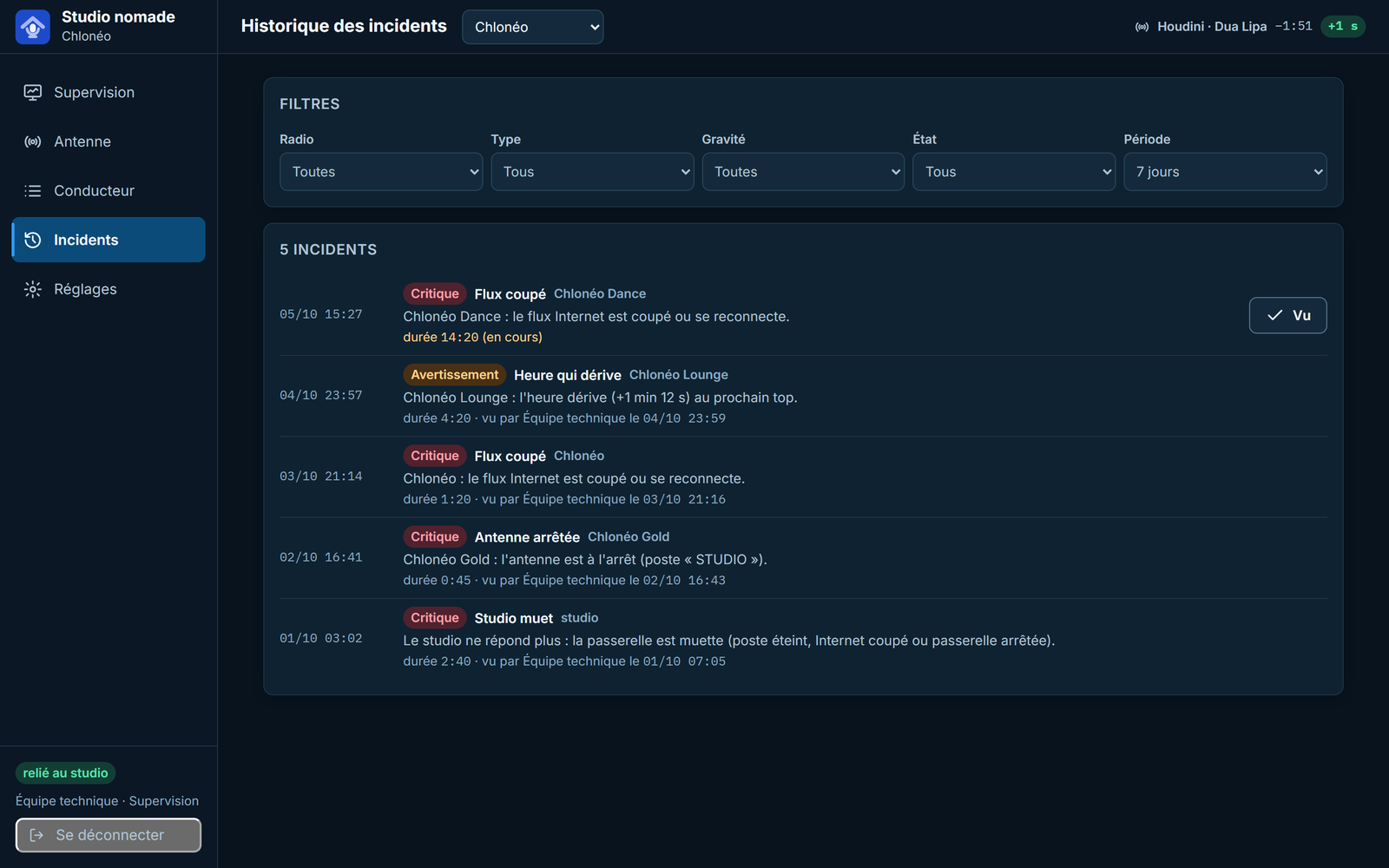
Incident history: filters by station, type, severity, state and period; a stream outage in progress with the “Seen” button, four incidents over and seen
The incident history. Filtered by station, type, severity, ongoing or over, and period. Each incident tells when it started, how long it lasted and who saw it; “Seen” acknowledges it.
The board of stations on a phone
The board in your pocket. On a phone, the tabs at the bottom switch between the board, the air, the incidents and the settings.
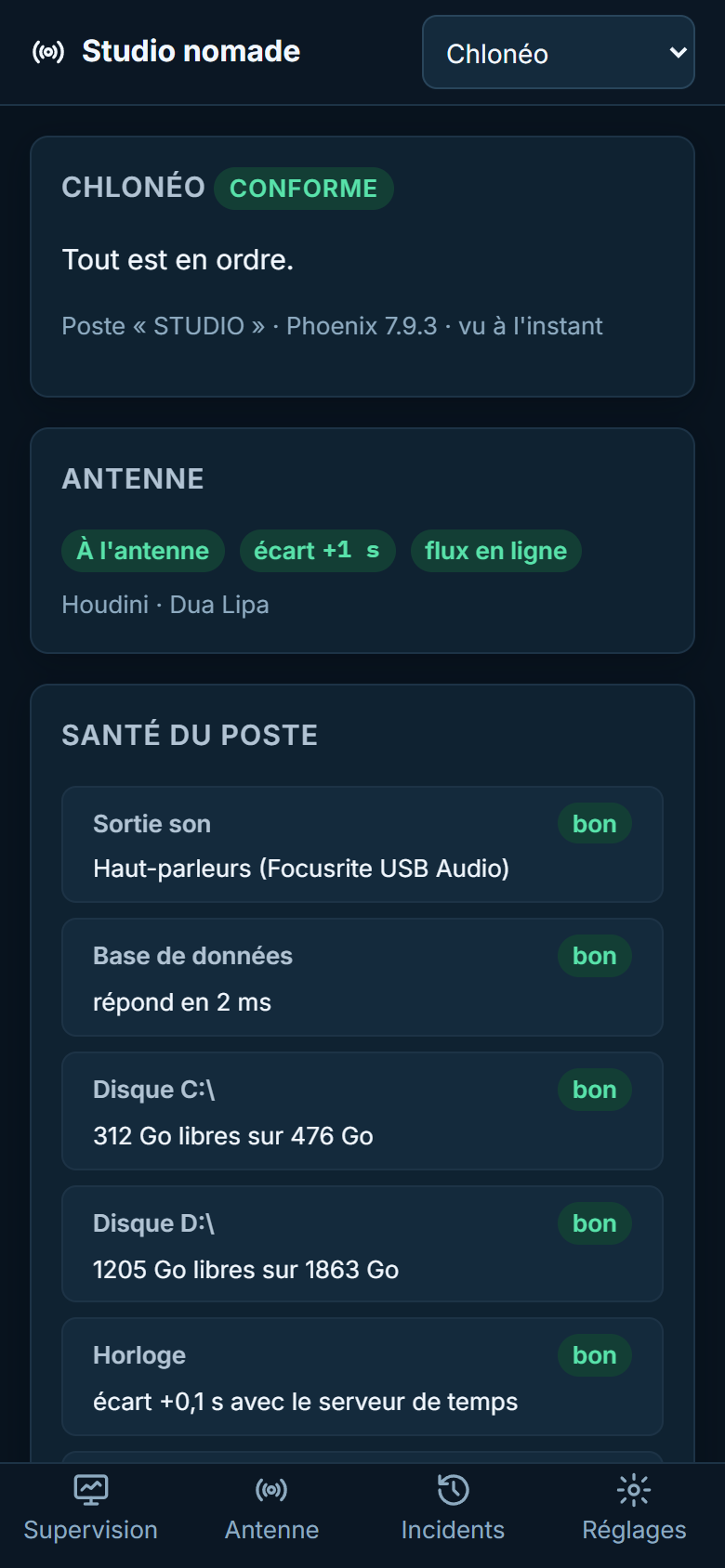
The Chlonéo station page on a phone: status, air, workstation health
The station page, on a phone. The status, the air and the health of the workstation, item by item.

Screenshots of the actual application (French interface), on a demonstration relay: four stations of a fictitious network around Chlonéo.

What triggers an alert

Each alert arrives as a notification on the subscribed devices, by e-mail if it is critical, then “Restored” when it stops.

🔇

Studio or Phoenix silent

The studio gateway has not answered for one minute, or Phoenix has given no news for 90 seconds: critical alert.

⏹️

Air stopped, stream down

The air stopped for 30 seconds, the Internet stream down for one minute: critical alert.

⏱️

Time drifting

A gap to the next top of the hour above 60 seconds for two minutes: warning. On the station page, the curve of the last 24 hours shows where it comes from.

💽

Disks, clock, backup

A disk almost full (less than 5 GB or 5 %), the workstation clock off by more than one second, a database backup older than 26 hours: warning.

🔄

Backup copy and On-Air Failover

The database copy to the backup PC stopped for five minutes: warning. With On-Air Failover, the backup PC on air: critical alert, straight away.

🔔

Phoenix alerts

Alerts from the Phoenix alert centre come up too, with their severity. “Seen” acknowledges them in Phoenix, just as in the studio.

Seeing from outside, without opening the studio

Supervision uses the same application and the same relay as the Remote Voice Tracker.

🔒

No open port

The on-air PC only makes outgoing connections to a relay hosted by Chloneo, one per customer. The relay sees the workstation go down from outside, even when the PC is off.

🔑

Two-factor authentication

Phoenix credentials, then a 6-digit code or a passkey.

👥

The Supervision role

Made for the technical team: see every station and acknowledge alerts, without touching the air. Access is granted in Phoenix, person by person, station by station.

A Phoenix Pro option, quoted on request

Supervision is added to Phoenix Pro, per supervised station. It builds on the relay hosted by Chloneo, the same one as the Remote Voice Tracker.

Request a Quote