v7.0.0 Beta — AI News Flash, Onyx V3, Triple Buffer, Sweeper Overlay
Radio Automation

Phoenix Pro
Radio broadcasting reinvented

Phoenix Pro combines the power of a professional automation system with artificial intelligence. Modern interface, advanced features, and immediate usability.

Phoenix Pro
Phoenix Pro - Main Interface

Everything you need

Phoenix Pro integrates all the features expected from a professional automation system, and much more.

🎙️

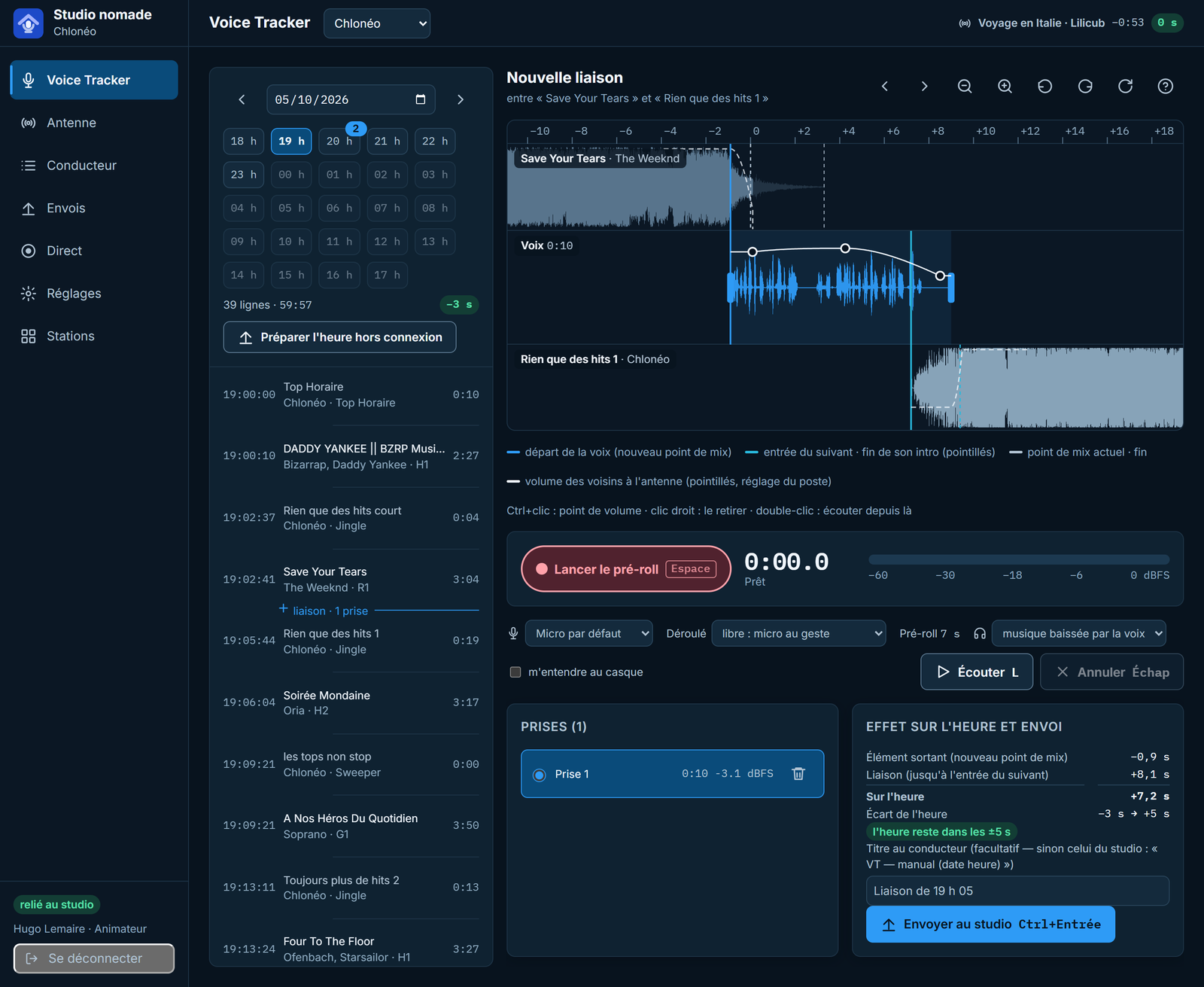
Voice Tracker & Segue Editor

Record your voice tracks and adjust transitions with the Zetta-style graphical editor. Waveforms, fade, overlap.

🎚️

Intelligent automatic mixing

Automatic analysis of cue points (intro, mix, outro) for perfect transitions. The algorithm learns from your preferences.

🎛️

48-button Cart Wall

Launch your jingles, effects and stingers instantly. 48 customizable shortcuts with preview and fade.

📊

Professional VU meters

4 ultra-responsive VU meter styles: LED bars, analog needles, circular arcs and live waveform.

🔴

On Air Mode

Full-screen interface dedicated to live broadcasting. Custom logo, clock, and discreet exit button.

🤖

AI Animator

The AI assistant generates anecdotes and information about each track for your presenters. Phoenix Pro exclusive.

🎬

Visual Radio vMix NEW

Complete video automation: dynamic titling (artist, title, cover art), scene transitions and audio/video synchronization from the playlist.

🌍

Multilingual interface NEW

Full interface in 4 languages: French, English, Spanish, German. Instant switch in settings.

📢

Traffic Manager NEW

Multi-zone ad management with calendar scheduling, time slots and automatic broadcast reports.

Total control of your broadcast

The 3-track player provides a clear view of what's on air: previous track, current track and next track.

  • Real-time waveforms
  • Visible cue markers (intro, hook, mix, outro)
  • Individual volume control
  • Play, Pause, Fade, Next buttons
  • Metadata and cover art display
  • Timer and remaining time counter
3-Track Player Phoenix Pro
Music Library Phoenix Pro

Manage thousands of tracks

High-performance PostgreSQL database to manage your music library, whether it contains 100 or 100,000 tracks.

  • Folder import with automatic scan
  • ID3 metadata extraction
  • Categorization by genre, tempo, energy
  • Instant full-text search
  • Album cover art management
  • Automatic cue point analysis

Complete artist management

A dedicated artist database with photos, biographies and enriched information for your presenters.

  • Artist profiles with photos and biographies
  • Links to social media and official websites
  • Broadcast history
  • Custom notes and comments
  • Alias and featuring grouping
  • Automatic enrichment via AI Animator
Artist Database Phoenix Pro
Metadata Editor

Edit all information

A complete editor to manage your track metadata: ID3 tags, cue points, categories and more.

  • ID3 tag editing (title, artist, album...)
  • Cue point definition (intro, hook, outro)
  • Album cover art management
  • Categorization and custom attributes
  • Batch editing of multiple tracks
  • Built-in audio preview

Create your ideal interface

Customize the Phoenix Pro interface to your needs. Create and save different layouts for each use case.

  • Drag & drop widget arrangement
  • Multiple saveable layouts
  • Compact or extended mode
  • Hide unused panels
  • Customizable keyboard shortcuts
  • Per-user profiles
Layout Editor

Connected to your ecosystem

Phoenix Pro integrates seamlessly with your existing tools.

🎮

StreamDeck

Native plugin to control all functions from your StreamDeck. Play, fade, cart wall, and more.

🎬

vMix & OBS Commands

Integrate vMix/OBS commands directly in the playlist for complete video automation. Scene changes, overlays.

📤

Multi-Format Import/Export

Export your playlists in Wave, CSV, XML. Compatible with Zetta, WinMedia, mAirList and other software.

🗄️

PostgreSQL

Robust database for multi-workstation. Share your library between multiple machines.

📋

Onyx

Native integration with Onyx for music scheduling. Your generated playlists arrive directly.

🔊

ASIO & WASAPI

Support for professional audio interfaces with minimal latency.

AI Animator: AI on the mic

No more searching the internet for anecdotes. The Phoenix Pro AI assistant automatically generates relevant information about each track in your playlist.

  • Anecdotes about artists and songs
  • Information adapted to radio format
  • Ready-to-read on-air texts
  • Anthropic Claude and OpenAI GPT support
  • Automatic profile enrichment
  • Animation script generation
Try AI Animator
AI Animator Phoenix Pro

Visual Radio — vMix Automation

Synchronize your audio and video broadcast in real time. Phoenix Pro controls vMix directly from the playlist for 100% automated Visual Radio.

  • Dynamic titling: artist, title, year, cover art
  • Automatic scene transitions (Fade, Cut, Stinger)
  • Intelligent video media preload
  • Audio/video synchronization without drift
  • Customizable vMix field configuration
  • Compatible with all existing vMix scenes
Visual Radio vMix Phoenix Pro

Commands integrated in the playlist

Fully automate your broadcast by integrating commands directly into your playlist. Radio and video synchronized.

  • vMix commands (scene changes, overlays)
  • OBS commands (sources, transitions)
  • External script triggering
  • Equipment control via GPI/GPO
  • Automatic multi-zone ad insertion
  • Log export to third-party systems
vMix OBS Commands in Phoenix Pro
Import Export Phoenix Pro

Multi-platform Import & Export

Exchange your playlists and libraries with other systems. Standard formats and extended compatibility.

  • Consolidated Wave playlist export
  • CSV, XML, JSON export
  • Import from Zetta, WinMedia, mAirList
  • Synchronization with traffic systems
  • REST API for custom integrations
  • Multi-format broadcast logs

Technical Specifications

Phoenix Pro is designed for demanding professional environments.

Operating System Windows 10/11 (64-bit)
Processor Intel Core i5 or equivalent (i7 recommended)
RAM 8 GB minimum (16 GB recommended)
Storage SSD recommended for the library
Database PostgreSQL 14+ (included in installer)
Audio ASIO, WASAPI, DirectSound
Supported Formats MP3, WAV, FLAC, AAC, OGG, WMA
Network Internet connection for AI Animator and updates

Switch to Phoenix Pro

Join the radio stations that have chosen the next generation of automation.

Request a Quote Discover Onyx